Table of Contents
West Bengal Voter List 2002
If you want to download the West Bengal voter list 2002 pdf district-wise from the official site ceowestbengal.wb.gov.in, you’re in the right place! This simple guide will show you how to get the old 2002 voter list (from Special Intensive Revision – SIR) easily on your mobile or laptop. The PDFs are available in the official website which is ceowestbengal.wb.gov.in. Just follow these easy steps below to find district-wise, area-wise, and booth-wise voter lists quickly and safely.
Why Need for WB Voter List 2002?
The 2002 voter list of West Bengal was made because the Election Commission wanted to clean the voter list very carefully. The last big clean-up (called Special Intensive Revision or SIR) happened long back in 2002. After that, for more than 20 years, many problems came in the list—like dead people’s names not removed, same person registered in two places, migration, and some claims of wrong people (like possible illegal immigrants from Bangladesh) getting added to the voter list.

In recent years (around 2025-2026), the Election Commission started a new big revision again. They used the old 2002 list as the main base to check who is a real Indian citizen and who should stay in the voter list. This was done to make the list pure, remove fake or duplicate names, and stop any wrong entries before big elections. Many people had to show proof by linking their name (or parents’ name) to that 2002 list.
What will be the benefit of checking name in WB Voter List 2002 ?
Checking name in the 2002 voter list helps make the current voter list clean and correct. If your name (or your parents’/grandparents’ name) is already there, it proves you or your family were living in India and were citizens long back. This makes it very easy for you to stay in the new voter list without giving many extra papers. It stops fake or wrong names from staying in the list, so only real Indian citizens can vote. This way, elections become fairer and no one can cheat by adding fake voters.
Voter List 2026 West Bengal Pdf Download With Photo
How to Check Your Name West Bengal Voter List 2002 for SIR?
- First of all you have to visit the official website which is :- https://ceowestbengal.wb.gov.in/
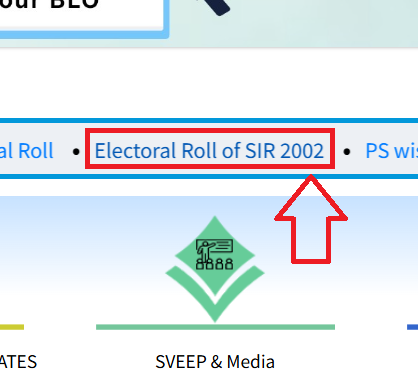
- Now look at for “Electoral Roll of SIR 2002”
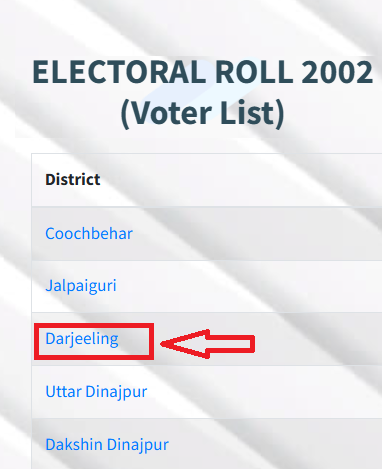
- You will see a list of districts. Click your district.
- Next, choose your Assembly Constituency (AC) from the list.

- Then, select your Polling Station (area or booth number).

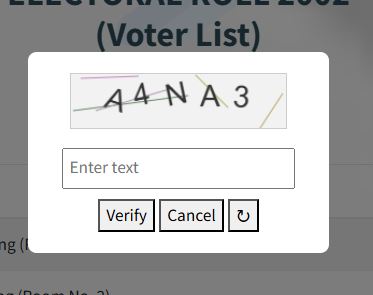
- Enter captcha if prompted and verify.
- The old 2002 voter list PDF will open.
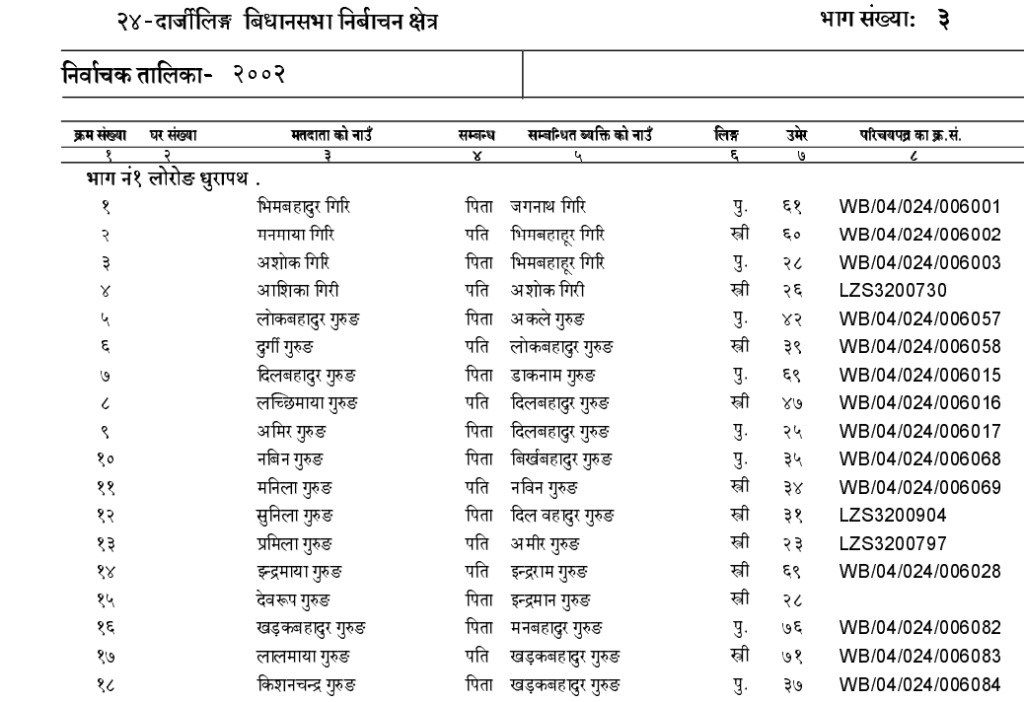
- father’s/mother’s/grandfather’s/grandmother’s name (use old spelling if needed).
- If found, note the details like part number, serial number – this helps in the current SIR process.
West Bengal 2002 Voter List For Kolkata district
- Open your browser and go to the official website: https://ceowestbengal.wb.gov.in/
- On the homepage, find the “What’s New” section and click the link for “Electoral Roll of SIR 2002” (it leads to the district list page).
- From the districts shown, select the one you need, like Kolkata NW, Kolkata NE, or Kolkata South.
- A list of Assembly Constituencies (AC) for that district will appear – pick the AC that matches your area.
- Next, you’ll see the polling stations (booth numbers or parts) – choose the correct one for your locality.
- If a CAPTCHA code appears, enter it to proceed.
- Click the “Final Roll” link or PDF option – this will open or download the 2002 voter list PDF for that polling station.
- In the PDF, use Ctrl+F (or search function) to look for your name, father’s/mother’s name, or family members. Try old or different spellings if it doesn’t match at first. If found, note the part number and serial number.
2002 West Bengal Voter List For North 24 Parganas district:
- Visit the official site right away: https://ceowestbengal.wb.gov.in/
- Scroll to and click on “Electoral Roll of SIR 2002” to reach the districts page.
- In the list of districts, click on “North 24 Parganas”.
- Select your relevant Assembly Constituency (AC) from the options displayed.
- From the polling stations list that comes up, pick the booth or part that corresponds to your area.
- Complete any CAPTCHA verification if prompted.
- Tap or click the “Final Roll” PDF link – the old 2002 electoral roll will load or save to your device.
- Open the file and search (Ctrl+F) for names using possible variations. Record details like serial and part numbers if your entry appears.
WB 2002 Voter List For South 24 Parganas District:
- Head to the Chief Electoral Officer West Bengal website: https://ceowestbengal.wb.gov.in/
- Look in the “What’s New” area for the “Electoral Roll of SIR 2002” link and open it.
- Choose “South 24 Parganas” from the districts list on the next page.
- Browse the Assembly Constituencies and select the one for your region.
- Pick your specific polling station from the available list (booth/area details).
- Enter the CAPTCHA if it shows to confirm you’re not a bot.
- Select the “Final Roll” option – the PDF of the 2002 voter list for that station will appear or download.
- Use the search tool in the PDF to find names (try different spellings for parents or family). Jot down key info like part/serial if located.
District Wise West Bengal Voter List 2002 Pdf Download
| Alipurduar | Maldah (Malda) |
| Bankura | Murshidabad |
| Birbhum | Nadia |
| Cooch Behar | North 24 Parganas |
| Dakshin Dinajpur | Paschim Bardhaman |
| Darjeeling | Paschim Medinipur |
| Hooghly | Purba Bardhaman |
| Howrah | Purba Medinipur |
| Jalpaiguri | Purulia |
| Jhargram | South 24 Parganas |
| Kalimpong | Uttar Dinajpur |
| Kolkata |
If not found online, go to your local Booth Level Officer (BLO) or polling booth – they can help check or guide you. Keep your Voter ID (EPIC) ready if you have it. This is for West Bengal SIR 2026 clean-up.
If Name Not Found in West Bengal Voter List 2002, What to Do?
- Check a senior family member’s name (parents/grandparents) – addresses/booths often match.
- If registered after 2002, use relative’s entry for mapping.
- Contact your Booth Level Officer (BLO) – they conducted door-to-door visits.
- Call helpline 1950 or contact CEO office.
- Submit enumeration forms with required documents if unmapped.
Check More Relaed Links
- Final Voter List West Bengal 2025-2026 Pdf Download
- 2002 Voter List West Bengal South 24 Parganas Pdf Download
- Voter List 1998 West Bengal Pdf Download by District Wise
- Draft Voter List 2026 West Bengal @ceo.west bengal.gov.in
- West Bengal | District – North 24 Parganas | Voter List Download
- Voter List 2000 West Bengal Pdf Download
- West Bengal | District – Alipurduar | Voter List 2026
- Voter ID Card Address Change Application Form 8A Online