How you can download voter id card download with photo by mobile, epic number because this card is very useful for many other purposes, such as opening a bank account, getting a mobile SIM card, applying for government schemes, proving address, filling job application forms, and more.
If your age is above 18 years and you still don’t have a Voter ID, you can easily apply for it online at www.voters.eci.gov.in or by visiting your local block/tehsil office.
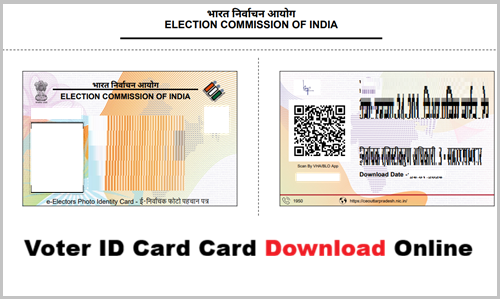
What is Voter ID Card (EPIC Card)
Voter ID is known as Voter Identity Card or Electoral Photo Identity Card in English. It is an important identification document issued by the Election Commission of India. When a person reaches the age of 18 years or more, they become eligible to vote and can get this card made by getting their name registered in the voters’ list.
It is a small plastic card that contains the person’s name, age, address, photograph, and a special number called the EPIC number. The main purpose of this card is to allow voting during elections, as it is the easiest and most accepted document for this purpose. Although voting is sometimes possible with other documents, the Voter ID is considered the most reliable and preferred one.
Voter Id Card Address Change Online
How to Download Voter Id Card With Photo?
- First of all you have to visit the official website.
- After that you have to scroll down the home page of official website and click on “E-EPIC DOWNLOAD” option.
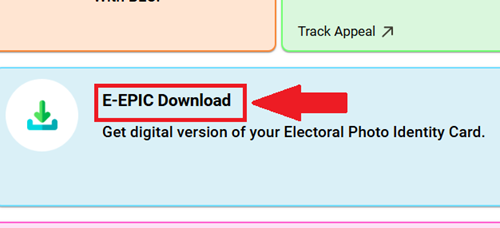
- Now you need to log in to the portal, and if this is your first time visiting the portal, you will need to create a login ID by clicking on the “sign up” option.
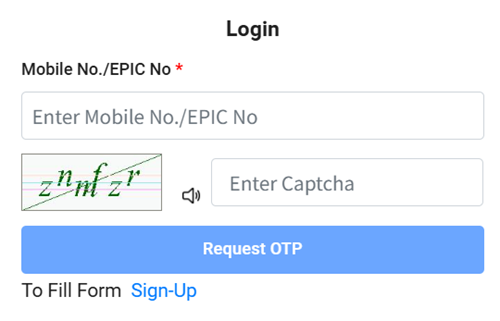
- Now, upon logging in, you will receive an OTP on your mobile number. Enter that OTP to verify your account.
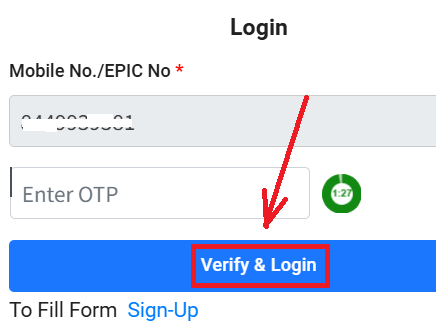
- On the page that has now opened, you need to enter your Voter ID (EPIC No.), select your state, and then click on the “Search” option.
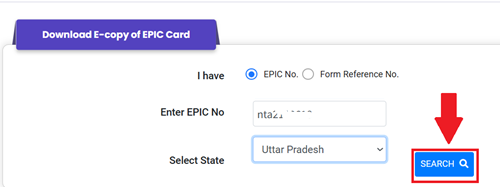
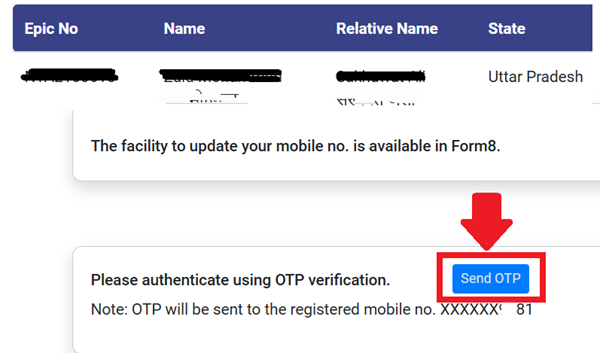
- On the page that opens next, you need to again click on the “Send OTP” option.
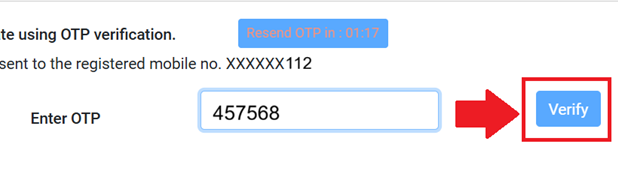
- Now, you need to enter the OTP that you received on your number and click on the “Verify” button.
- After this, you will see the option to “Download e-EPIC” you need to click on it.
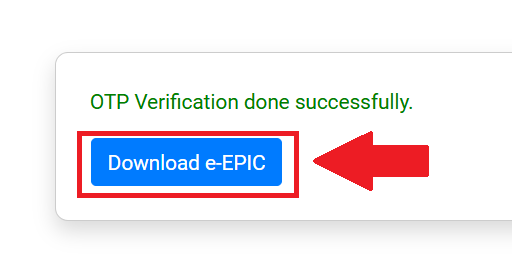
- Now, as soon as you click on the download button, your voter ID will be downloaded as a PDF.
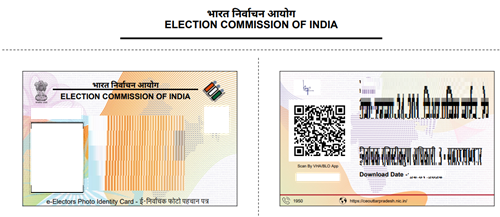
- This way, you can easily get your voter ID card online.
How to Check My Name in Voter List?
Why is Important Voter ID Card?
- It is the easiest and most accepted document to cast your vote during elections (Lok Sabha, Vidhan Sabha, Panchayat, etc.).
- Without it, voting can be difficult or sometimes not allowed.
- It helps prevent fake voting and ensures only genuine, registered voters participate, making elections fair and transparent.
- It proves your age (you must be 18+), name, photograph, and Indian citizenship.
- It is widely accepted as a valid government-issued ID proof almost everywhere.
- It serves as an official document to prove your residential address.
- Many government and private services require address proof, and Voter ID is commonly accepted for this.
New Voter ID Card Registration
How to Track Voter Id Card Status?
Hey Zaid, here’s a really straightforward, step-by-step guide in English to track your Voter ID card status (like for new application, correction, or duplicate) – just like I’m explaining it to a friend:
- First of all, you have to visit the official website – go to https://voters.eci.gov.in/ (this is the Election Commission of India’s Voters’ Services Portal, totally safe and official).
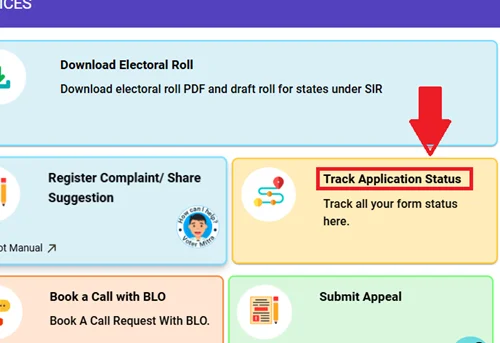
- After that, on the homepage, look for the option called Track Application Status
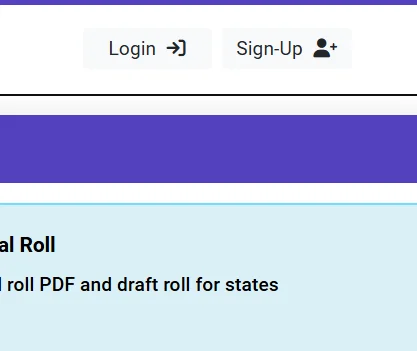
- Next, you’ll need to log in – click on Login or Sign In. Enter your mobile number.
- Then, if you have a password, type it in. Otherwise, just click Request OTP – you’ll get a one-time password on your phone.
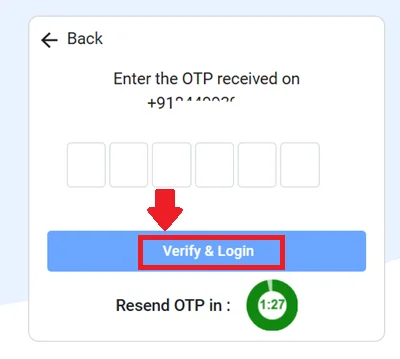
- After that, enter the OTP you received, fill in the CAPTCHA if it shows up, and hit Login or Verify.
- Once you’re logged in, go back to the dashboard or menu and select Track Application Status.
- Now, enter your reference number (this is super important – it’s the application ID or token number you got in SMS/email right after submitting the form, something like UP followed by numbers, e.g., UP123456789).
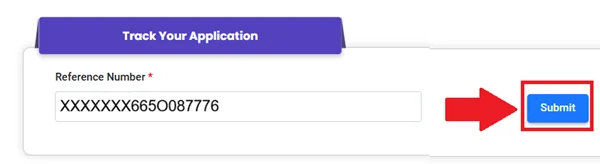
- Select your state (Uttar Pradesh since you’re in Meerut), fill any CAPTCHA if asked, and click Submit.
- That’s it! The page will show your current status right away – things like “Application Received”, “Under Process/Verification”, “Approved”, “Card
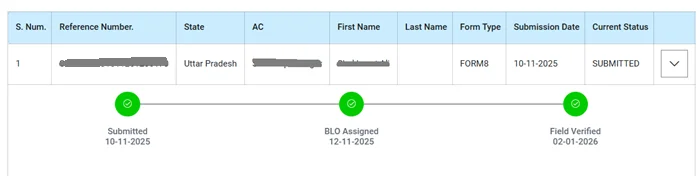
- Printed”, “Dispatched”, or if there’s any issue, it’ll show the reason.
If you don’t have the reference number or face any trouble logging in, you can call the free helpline 1950 and give them your details, or download the Voter Helpline app from Play Store/App Store and track it there the same way.
Voter ID Card (EPIC Card) Benefits
- It allows you to vote in elections like Lok Sabha, Vidhan Sabha, municipal, and panchayat polls.
- It acts as a strong official proof of identity accepted for bank accounts, SIM cards, passport applications, and many other services.
- Voter Card serves as valid address proof showing your registered residential address.
- It helps prevent fake voting, impersonation, and duplicate entries, keeping elections fair.
- Epic Card is often required or helpful to get government schemes, subsidies, rations, pensions, and other welfare benefits.
- It proves you are an Indian citizen above 18 years of age, useful for age and nationality verification.
- You can get a free digital version (e-EPIC) which is easy to carry on your phone and works for most purposes without the physical card.
Frequently Asked Questions (FAQs)
What is a Voter ID card?
A photo ID card issued by the Election Commission of India. It shows your name, photo, age, address, and a 10-digit EPIC number. Mainly for voting + acts as strong ID proof.
Who can get Voter ID Card?
Any Indian citizen aged 18+ who is a resident of India and not disqualified (e.g., no certain criminal convictions).
Is it compulsory to vote?
No, but it’s the easiest and most accepted document. You can vote with 12 other photo IDs (Aadhaar, passport, etc.), but Voter ID is preferred.
How to apply or download?
Apply online at voters.eci.gov.in (Form 6) with age/address proof. If already registered? Download free digital e-EPIC (PDF) from the same site using EPIC number or mobile OTP.
What if I lose it or need changes?
Download e-EPIC instantly from the website (no physical replacement needed). For name/address/photo update, use Form 8 online or contact your BLO. Helpline: 1950.