The voters list Kerala 2002 pdf download with all district & assembly constituencies (AC) covers the Special Intensive Revision (SIR) 2002 Electoral Roll by CEO Kerala, with qualifying date January 1, 2002, across all 14 districts (Thiruvananthapuram to Kasaragod) and 140 Assembly Constituencies. These booth-wise PDFs list voter names, ages, addresses, EPIC numbers, and polling details for historical research or verification. Download them from ceo.kerala.gov.in.
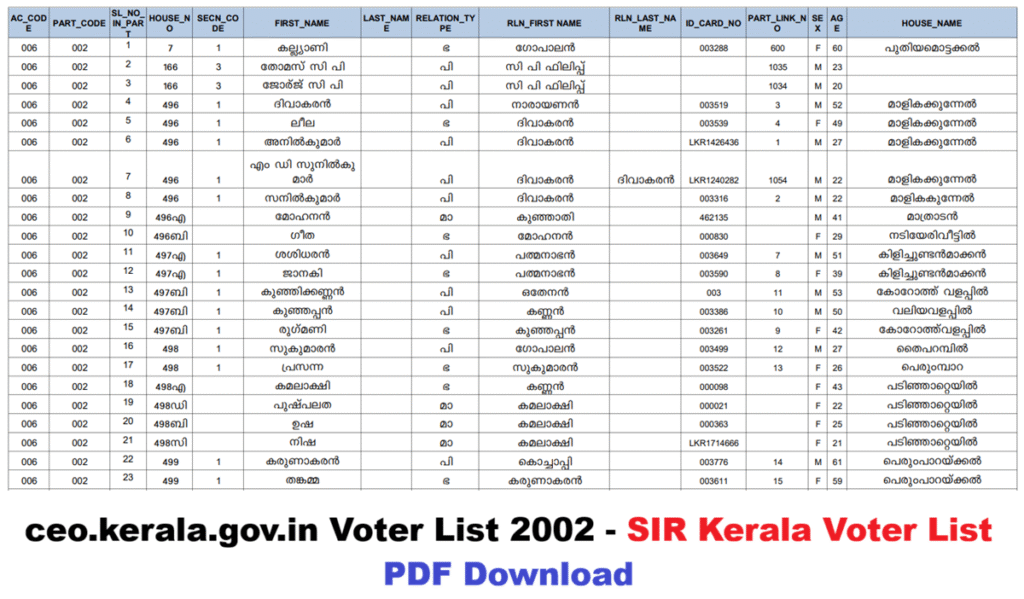
This list is still available because the Election Commission of India (ECI) is currently conducting the Special Intensive Revision (SIR 2026), where old voter lists (especially from 2002) are being used for voter verification. Many states, including Kerala, have made the 2002 SIR voter list publicly available on their official websites.
Kerala Voter List 2025 Pdf Download With Photo
- Download this ceo.kerala.gov.in voter list 2002 only from the official website www.ceo.kerala.gov.in. Avoid fake or third-party sites, as they may lead to data theft or incorrect information.
- The 2002 list is very old, so many names may no longer appear in the updated lists (due to death, relocation, etc.).
How to Download ceo.kerala.gov.in voter list 2002 For SIR 2002 Voter List PDF (Booth-wise)
- First of all you have to visit the official website.
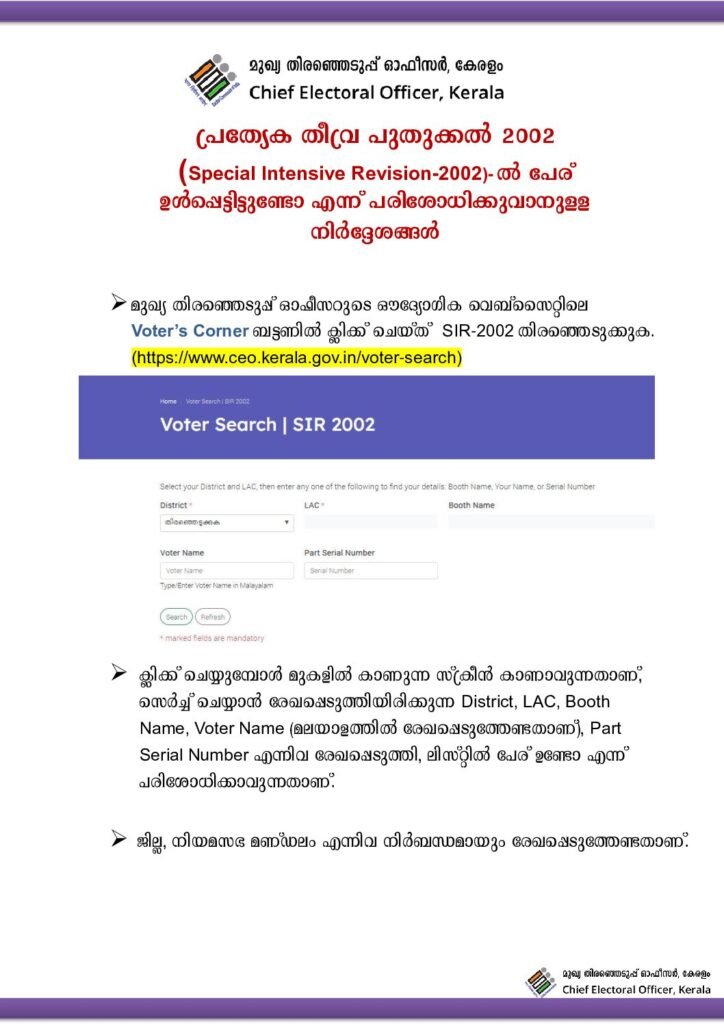
- Select your District from the dropdown (e.g., Thiruvananthapuram, Kollam, etc.).
- Select your LAC (Legislative Assembly Constituency).
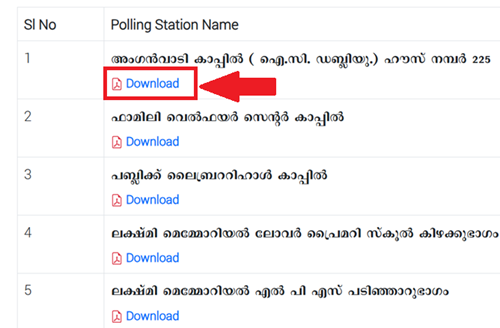
- The page will display a list of all polling booths.
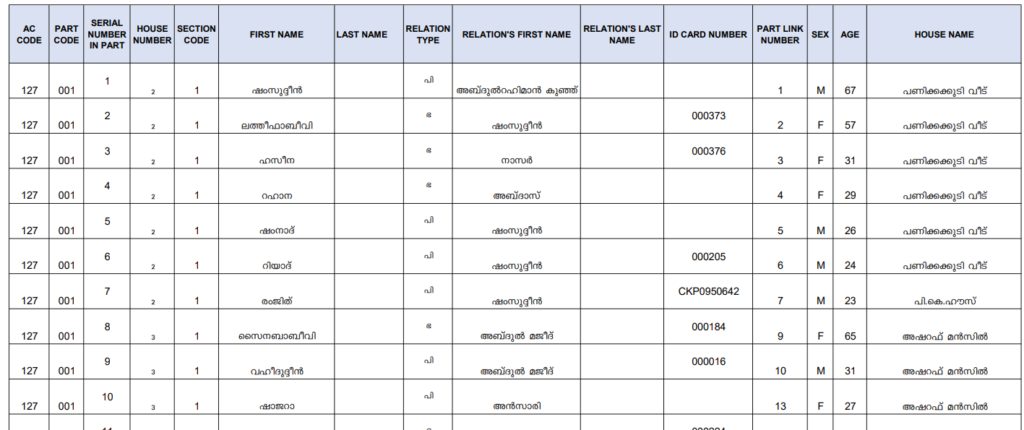
- Next to each booth, there will be a voter list PDF link and download option.
- Click on the PDF for your booth to download it.
For Thiruvananthapuram district:
- Open your browser and go to the official CEO Kerala page for SIR 2002: https://www.ceo.kerala.gov.in/electoral-roll-sir-2002
- On the page, select your district from the dropdown or list – choose “Thiruvananthapuram”.
- Next, select the Legislative Assembly Constituency (LAC) that matches your area (like Thiruvananthapuram, Nemom, Vattiyoorkavu, etc.).
- The page will load a list of all polling booths (parts) in that LAC – find and click on the relevant booth name or number.
- Look for the download option next to the booth – click it to get the voter list PDF for that part.
- If a CAPTCHA or verification appears, enter the code to proceed.
- The 2002 SIR voter list PDF will download or open – save it to your device.
- Open the PDF and use Ctrl+F to search for your name, father’s/mother’s name, or house number (try old spellings or variations if needed). Note the serial number or other details if found.
For Ernakulam district:
- Visit the dedicated SIR 2002 electoral roll page: https://www.ceo.kerala.gov.in/electoral-roll-sir-2002
- From the district selection, pick “Ernakulam”.
- Choose the appropriate Legislative Assembly Constituency (LAC) for your location (such as Ernakulam, Thrikkakara, Kalamassery, or Kochi).
- A list of polling stations/booths will display – scroll to find and select the one for your area.
- Click the download link or button provided for that booth’s voter list.
- Complete any CAPTCHA if prompted for security.
- Download the PDF file containing the 2002 electoral roll details.
- In the opened PDF, search (Ctrl+F) for names, relatives, or addresses. Record part/serial info if your entry shows up.
For Kozhikode district:
- First of all you have to visit the official website which is https://www.ceo.kerala.gov.in/electoral-roll-sir-2002 – the official SIR 2002 section.
- Select “Kozhikode” as your district from the options.
- Pick the relevant Legislative Assembly Constituency (LAC) like Kozhikode North, Kozhikode South, Beypore, or Vadakara.
- The booth list will appear – choose the polling station/part that corresponds to your old address or area.
- Hit the download option beside the selected booth.
- Enter CAPTCHA details if the site asks to verify.
- The PDF of the 2002 voter list for that booth will download automatically.
- Use the PDF’s search function to look up names (try different spellings for family members). Jot down key details like serial number if located.
This is the easiest method if you need the full list for a booth or area.
2. How to Search Your Name in the SIR 2002 List
Official Page: https://www.ceo.kerala.gov.in/voter-search
- Open the link.
- Select District and LAC.
- Enter any one of the following details:
- Booth Name
- Your Name
- House Name
- Serial Number (if known)
- Click the Search button.
- If your name is found, the details will appear (and you can access the related PDF).
Why is the 2002 List Available?
- Currently, ECI is running SIR 2026 nationwide (with house-to-house visits in November-December 2025).
- This process verifies voters against old lists (2002/2003) to confirm they are still alive and at the correct location.
- That’s why the Kerala CEO has made the 2002 SIR list publicly available.
If you face any issues (e.g., page not loading), call the CEO Kerala helpline at 1950 or contact them via their website.
Voter List Kerala 2026 Pdf Download