Table of Contents
how I check my name in voter list or voter id search by name? because voting is one of the most important rights for every Indian citizen. Before you can vote, it is very important to make sure your name is in the voter list.
voter id search by name or check my name in voter list is a simple and quick process. The fastest and most accurate way is to use your EPIC number. The EPIC number is the unique 10-digit number printed on your Voter ID card (Electors Photo Identity Card). If you have this number, you can easily Check My Name in Voter List in just a few minutes.
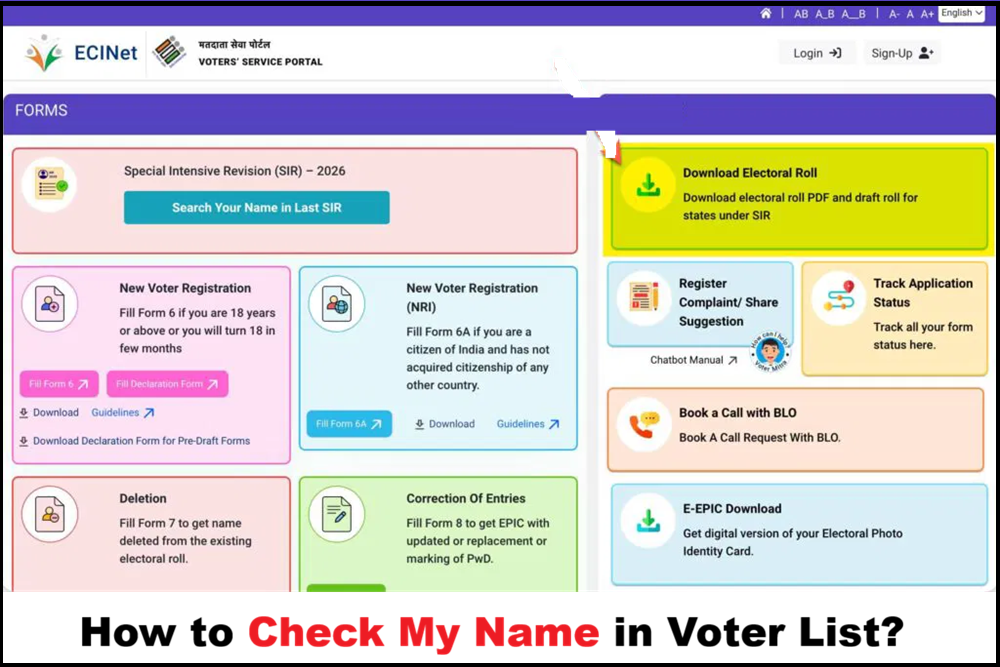
In 2026, the Election Commission of India is running the Special Intensive Revision (SIR) to update and clean the voter lists in many states, including Uttar Pradesh. During this time, it is even more important to Check My Name in Voter List to confirm your details are correct.
Why You Should Regularly Check My Name in Voter List
Many people think that once they get a Voter ID, everything is fine forever. But sometimes names get shifted, removed by mistake, or details become wrong due to updates.
Online Method to Check My Name in Voter List by EPIC Number
The Election Commission of India provides official websites and apps where you can check my name in voter list from home.
- First of all you have to visit the official website of electroll
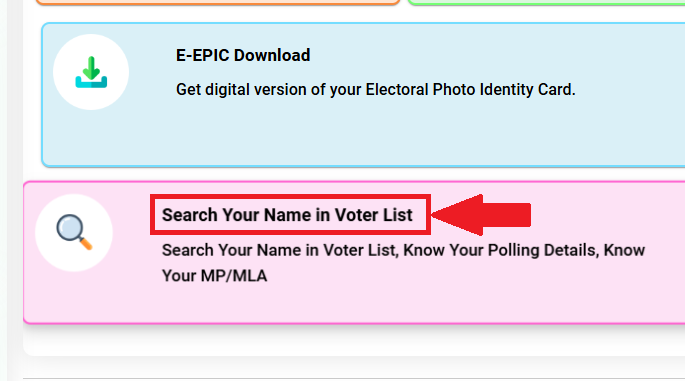
- After that you have to click on “Search Your Name in Voter List” option.
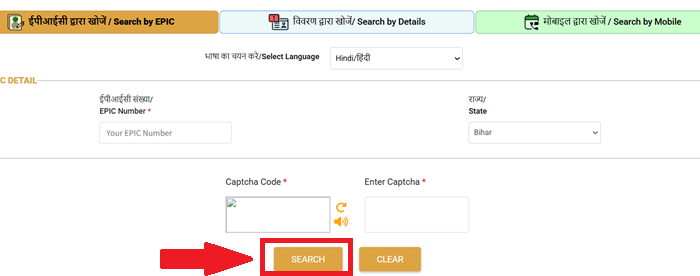
- Now you can search for your voter ID here through three options: (1) via EPIC number, (2) via name search, and (3) via mobile number.
- The page that opens now will show you a “View Details” option, which you need to click.
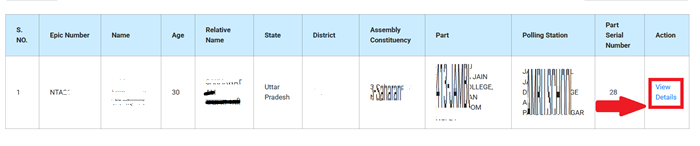
- This will display the complete voter list information, where you can check all your details.
New Voter ID Card Registration
Using the voter helpline Mobile App to check my name in voter list
- Download “Voter Helpline” from Google Play Store or Apple App Store.
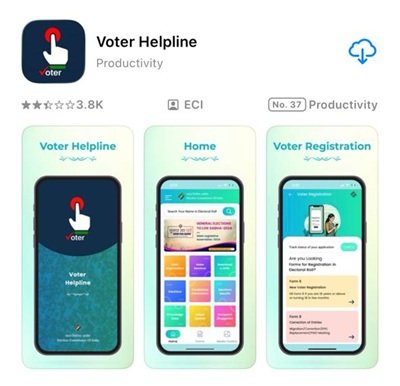
- Open the app and register or log in with your mobile number.
- Go to the section “Search Your Name in Electoral Roll” or “Electoral Search”.
- Now enter your mobile number and state.
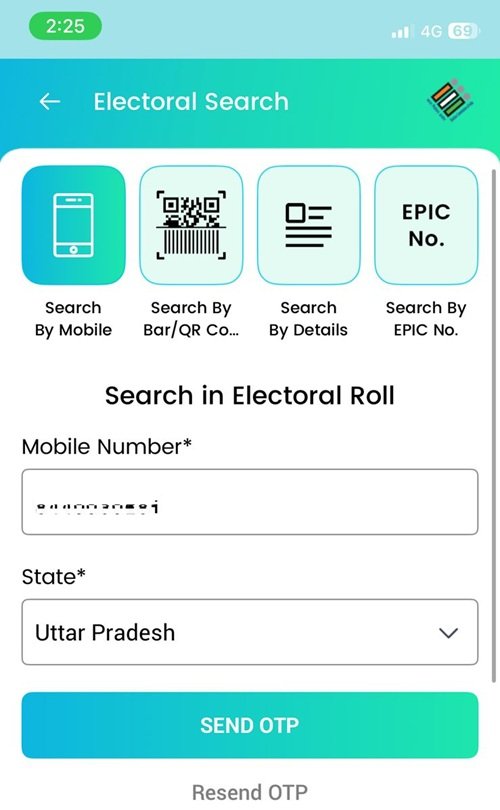
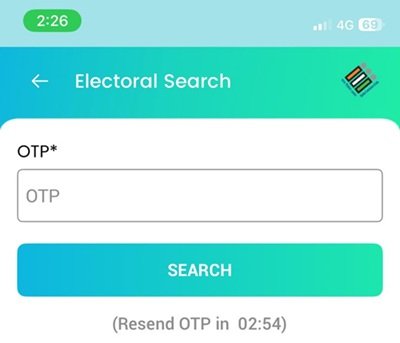
- Now you will receive an OTP on your registered mobile number, which you need to enter to complete the verification process.
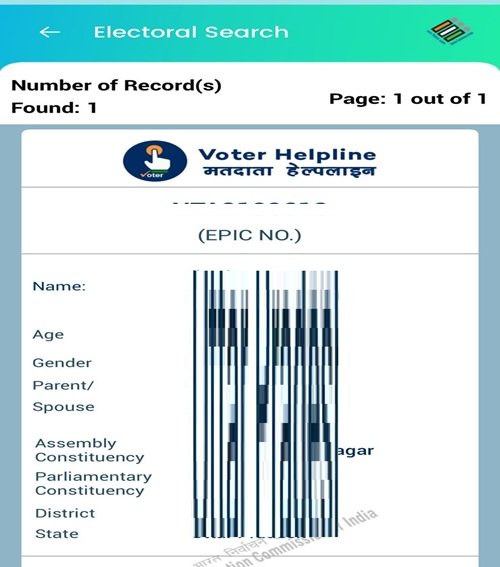
- You will see your voter details, including your polling booth.
- The app is very useful because it also sends notifications if there are any changes in the voter list.
How to Download electoral roll PDF and draft roll for states under SIR?
Open your browser and go to the official website: https://voters.eci.gov.in/
On the homepage, look for and click on “Download Electoral Roll”.
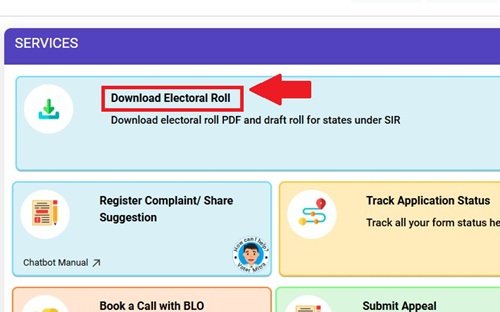
Select your State from the dropdown list (only states/UTs under SIR will show SIR options like Draft Roll or Final Roll).
Choose the Year/Type of Roll:
- For draft roll → Select SIR Draft Roll (or “Draft Electoral Rolls – SIR 2026” if shown).
- For final roll → Select SIR Final Roll (published after draft, usually in February 2026).

Select your District, Assembly Constituency (AC), and Language (if asked). You will see options like:
- Download SIR Draft Roll for full AC (whole constituency PDF).
- Or select specific parts/polling stations and Download Selected PDFs.
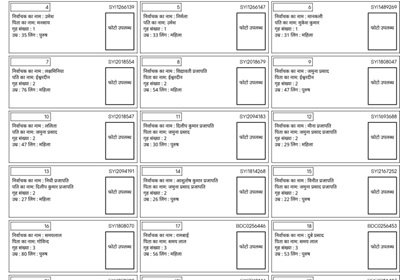
Enter the Captcha code shown on the screen (type the letters/numbers correctly). Click Download or Download Selected PDFs. The PDF file will download to your device. Open it to search your name, part number, or details
Voter Id Card Address Change Online
What to do if you do not have your EPIC number to check my name in voter list?
- Use “Search by Details” on the electoral search portal – enter your full name, father’s name, age, state, and district.
- In some cases, search by mobile number is available.
- Contact your local Booth Level Officer (BLO) – they have the voter list copy and can help you.
Offline Ways to Check My Name in Voter List
- Meet your local Booth Level Officer (BLO). Give them your EPIC number – they will check the list for you.
- Visit the nearest Electoral Registration Office (ERO) or Tehsil office.
- Call the toll-free Voter Helpline number 1950 and ask for help to check my name in voter list.
- In some cases, send an SMS: Write “EPIC” followed by your EPIC number and send to 1950.
UP Voter List 2026 Pdf Download With Photo – Final SIR DraftRoll
Special Intensive Revision (SIR) 2026 – Why check my name in voter list now?
In 2025-2026, the ECI is doing a big update called Special Intensive Revision (SIR) in many states, including Uttar Pradesh. Draft voter lists are published, and names are checked for accuracy.
During SIR:
- Draft rolls are released (you can see them on state CEO websites like ceo.up.nic.in).
- Search by EPIC number is available on draft rolls.
- If your name is missing or wrong, file claims/objections using Form 6 (new registration) or Form 8 (correction).
Common problems and solutions when you check my name in voter list
- Name not found? Try different spellings (first name, last name variations).
- Mobile number not linked? Update it using Form 8.
- Old Voter ID lost? Use the portal to download e-EPIC after you check my name in voter list.
- Age 18+ but name missing? Apply online with Form 6.
Voter List 2026 Rajasthan Pdf Download With Photo
FAQs
How do I check my name in the voter list using EPIC number?
Open the website electoralsearch.eci.gov.in in your browser. Select the option Search by EPIC. Choose your state Uttar Pradesh and your language. Type your 10-digit EPIC number carefully. Solve the captcha and click Search.
How can I check using my mobile number?
Go to electoralsearch.eci.gov.in and select Search by Mobile. Pick your language and state Uttar Pradesh. Enter the mobile number that is already linked to your voter record. An OTP will come on your phone. Type that OTP to verify. After verification your name and voter details will show if the number is correctly linked.
What if I don’t have or remember my EPIC number?
On the same website use the Search by Details option. Fill in your full name, father’s or husband’s name, your age or date of birth, gender and district like Agra. Submit the form. The system will search and show your record if the details match. You can also try mobile search if your number is registered.
Can I check my voter name through SMS?
Yes it is very easy. From your registered mobile phone type EPIC followed by one space and then your full 10-digit EPIC number. For example EPIC ABC1234567. Send this message to 1950. In a short time you will get a reply SMS with your name, age, address, polling station and other details. Normal SMS charges apply.
What is the helpline number for help?
Dial the toll-free Voter Helpline number 1950 from any phone. When the call connects tell the person you want to check your name in the voter list. Give your EPIC number if you have it or tell your name, father’s name, age and Agra address. They will check on their system and tell you the status right away.
Does this work in Uttar Pradesh under Special Intensive Revision?
Yes the process is exactly the same in Uttar Pradesh even during SIR. You can use electoralsearch.eci.gov.in normally for EPIC or mobile search. For SIR draft or final roll you can also go to voters.eci.gov.in and look for the Search Your Name in Last SIR section to see if your name is in the latest published roll.
What should I do if my name is not found?
If your name does not appear even with correct EPIC or mobile it may have been deleted or not updated. Find your local Booth Level Officer BLO name and number from the Voter Helpline App or ECI website. Talk to your BLO. You can also apply online using Form 6 for new name addition or Form 8 for correction on voters.eci.gov.in.
Is mobile number linking necessary?
Yes mobile search only works if that number is already linked to your voter ID in the Election Commission records. If your number is not linked or you have a new number then use EPIC search or details search. To add or change mobile number fill Form 8 online at voters.eci.gov.in and submit it.
Is the Voter Helpline App good for this?
The Voter Helpline App is free and very helpful. Download it from Google Play Store or Apple App Store. Open the app and go to Electoral Search